Easy TikTok Links
Copy a TikTok video URL from the app or website and paste it directly into the downloader.

Save supported TikTok videos for free, right in your browser.
Turn a copied TikTok video link into a simple browser-based download, without adding extra steps to the process.
Copy a TikTok video URL from the app or website and paste it directly into the downloader.
Go from a valid video link to the download action without navigating through a format selection screen.
Handle the entire process online in a modern browser, with no separate program required.
Paste and process TikTok links comfortably from a phone, tablet, laptop, or desktop computer.
Submit the copied URL through a focused interface built around one clear TikTok download task.
Use the TikTok downloader for supported links without paying for basic access or creating an account.
A TikTok video link is all you need to complete these three straightforward steps.
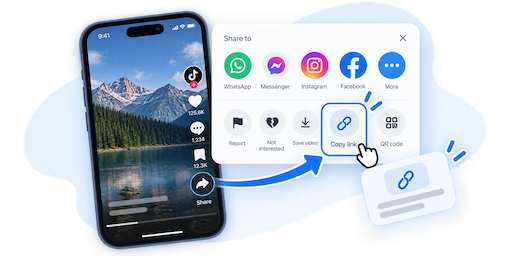
Open the video in TikTok, tap Share, and copy its link. You can also copy the URL from a browser.
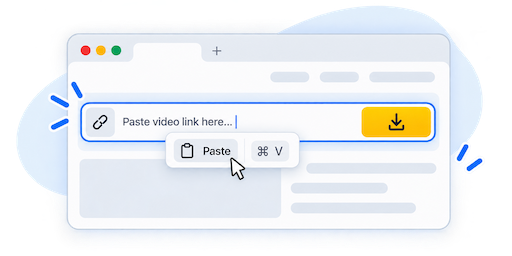
Return to the download form, paste the copied TikTok URL into the input, and press Download.
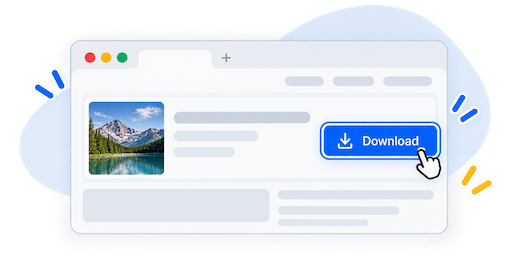
When the link has been processed successfully, use the available download button to save the video.
The same focused workflow works whether you find a TikTok video in the app or while browsing on another device.
Use the Share menu to copy a video's link, then switch back to your browser and paste it into the form.
When viewing TikTok on the web, copy the complete video URL from the address bar or its share options.
Use a modern mobile or desktop browser and save the result through the download controls provided by your device.
Complete the process online without installing a dedicated desktop program or browser extension.
EzSave provides a straightforward way to download supported TikTok videos from a copied link. Instead of moving through a long series of screens, paste the video URL into the form and start the download process from your browser. The tool is designed for quick, occasional saves on phones, tablets, laptops, and desktop computers.
When you find a video in the TikTok app, open its Share menu and choose the option to copy the link. Return to EzSave, paste that URL into the downloader, and press Download. This keeps the workflow familiar on mobile because you can move directly from the TikTok app to your browser without installing another download application.
TikTok video links can also be copied while browsing on a computer or mobile device. Open the individual video page and copy its complete URL from the address bar or the available share controls. A direct video link helps the downloader identify the content you intended to process. Profile pages, incomplete URLs, or links to unavailable posts may not work.
Because the downloader runs online, the basic steps remain consistent across devices: copy, paste, and download. Your browser determines where the finished file is stored. On many devices it appears in the Downloads folder, although your browser settings may ask you to choose a different location.
You do not need a dedicated desktop program, browser extension, or EzSave account to submit a supported TikTok video link. If a URL cannot be processed, confirm that it is complete and that the post is still accessible before trying again. Platform updates and access restrictions can sometimes affect availability.
Download only videos you created or have permission to save. A downloaded file does not grant ownership or permission to republish someone else's work. Respect creators, privacy, applicable laws, and TikTok's terms whenever you save or use online content.
Quick answers about using EzSave with TikTok video links.