Easy to Use
Start with the post containing the video, then paste its link into the downloader.

Download supported X (Twitter) videos directly in your browser.
Found a video in a post on X? Copy the post link and use your browser to save a supported result.
Start with the post containing the video, then paste its link into the downloader.
Keep your X video downloads in the browser without installing another program.
Open a video post in one tab and submit its link here using your usual browser.
Copy a post link in the X app and return to your mobile browser to download.
Copy the post URL, submit it, and save the returned video when processing succeeds.
Submit supported X video post links with free basic access and no downloader account.
Copy the link to the post containing the video, whether you are using the X app or website.
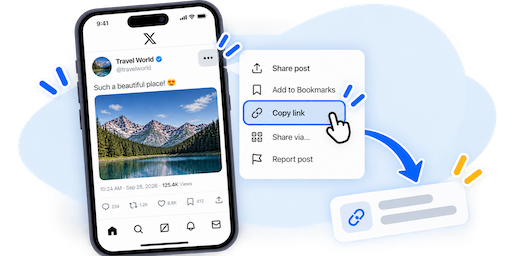
Open the post containing the video you want to download, use the Share option, and copy the post link.

Paste the copied X or Twitter URL into the downloader field above and start processing it.
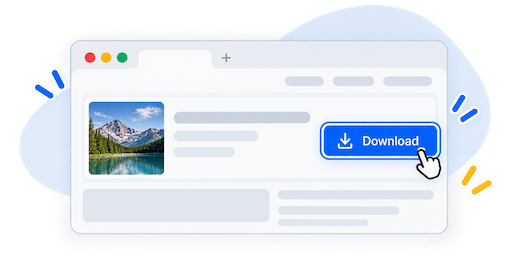
When the result is ready, choose an available download option and save the video to your device.
A post link is the starting point. Use the original post containing the video you want to save.
Open the post, tap Share, and copy its link before switching to your browser.
Open the individual post and copy its full address rather than a profile, search, or feed URL.
The post must be supported and publicly accessible. Protected or removed posts may not return a video.
Use a phone, tablet, or desktop browser to submit the link and save the available download.
EzSave X (Twitter) Downloader is an online tool for saving supported videos from public posts. Copy the link to the post containing the video, paste it into the form above, and start processing. If a video download is returned, save the file through your browser.
X, formerly Twitter, is still often searched for as a Twitter video downloader. This page brings that download workflow into one place: use the video post link, rather than a profile or timeline, to identify the content you want to save.
In the X app, open the post and use its Share option to copy the link. If you found the video through a repost or quoted post, open the original post containing it before copying. On the website, you can copy the individual post URL from the browser address bar.
If an older saved Twitter link no longer opens the video, locate the original post on X and copy its current link. Check that the link opens the post you intended to download before submitting it.
After copying a post link on your phone, switch from X to your browser and paste it into EzSave. On a computer, keep the post and downloader in separate tabs. Once a result is available, your browser handles saving the video to your device.
Check the browser download list or Downloads folder for the saved file. If the post points to a video on another website, choose the relevant platform tool from the EzSave homepage.
The X video downloader works online without a dedicated application, browser extension, or EzSave account. The process starts with a supported video post URL and a modern browser.
A public post does not guarantee an available download. Protected accounts, removed posts, access restrictions, or changes on X can prevent processing. If a link fails, reopen the original post, check that its video is accessible, and copy the complete URL again.
Answers about X video post links, downloading, and using the tool on your device.